DataStax
捆绑包 (Bundles) 包含支持特定第三方与 Langflow 集成的自定义组件。
本页面介绍了 DataStax 捆绑包中可用的组件,包括用于读取和写入 Astra DB 数据库的组件。
Astra DB
建议您在配置 Astra DB 组件之前,先创建所需的数据库、键空间 (keyspace) 和集合 (collection)。
您可以通过此组件创建新的数据库和集合,但这仅在 Langflow 可视化编辑器中可行(在运行时不可行),并且在继续流配置之前,您必须等待数据库或集合完成初始化。 此外,并非所有数据库和集合配置选项都可通过 Astra DB 组件使用,例如混合搜索选项、PCU 组、vectorize 集成管理和多区域部署。
Astra DB 组件使用 AstraDBVectorStore 实例调用 Data API 和 DevOps API,从而对 Astra DB Serverless 数据库进行读写操作。
关于向量存储实例
Because Langflow is based on LangChain, vector store components use an instance of LangChain vector store to drive the underlying read and write functions. These instances are provider-specific and configured according to the component's parameters, such as the connection string, index name, and schema.
In component code, this is often instantiated as vector_store, but some vector store components use a different name, such as the provider name.
Some LangChain classes don't expose all possible options as component parameters. Depending on the provider, these options might use default values or allow modification through environment variables, if they are supported in Langflow. For information about specific options, see the LangChain API reference and vector store provider's documentation.
Astra DB 参数
您可以检查向量存储组件的参数,以详细了解它接受的输入、支持的功能以及如何配置它。
Some parameters are hidden by default in the visual editor. You can modify all parameters through the Controls in the component's header menu.
Some parameters are conditional, and they are only available after you set other parameters or select specific options for other parameters. Conditional parameters may not be visible on the Controls pane until you set the required dependencies.
有关可接受的值和功能的更多信息,请参阅 Astra DB Serverless 文档 或检查 组件代码。
| 名称 | 显示名称 | 信息 |
|---|---|---|
| token | Astra DB Application Token | 输入参数。具有访问向量数据库权限的 Astra 应用程序令牌。连接验证后,其他字段将自动填充您现有的数据库和集合。如果您想通过此组件创建数据库,应用程序令牌必须具有 Organization Administrator 权限。 |
| environment | Environment | 输入参数。Astra DB API 端点的环境。通常始终为 prod。 |
| database_name | Database | 输入参数。您希望此组件连接的数据库名称。或者,您可以选择 New Database 创建新数据库,然后等待数据库初始化后再设置其余参数。 |
| endpoint | Astra DB API Endpoint | 输入参数。对于多区域数据库,请选择离您最近的数据中心的 API 端点。要获取多区域数据库的区域列表,请参阅 列出数据库区域。此字段在您选择数据库时会自动填充,并默认为主区域的端点。 |
| keyspace | Keyspace | 输入参数。数据库中包含 collection_name 中指定的集合的键空间。默认值:default_keyspace。 |
| collection_name | Collection | 输入参数。您希望在此流中使用的集合名称。或者,选择 New Collection 以使用有限的配置选项创建新集合。为确保您的集合配置了正确的嵌入提供程序和搜索功能,建议在配置此组件 之前 在 Astra 门户或使用 Data API 创建集合。有关更多信息,请参阅 在 Astra DB Serverless 中管理集合。 |
| embedding_model | Embedding Model | 输入参数。连接一个 嵌入模型组件 来生成嵌入。仅在指定的集合没有 vectorize 集成 时可用。如果存在 vectorize 集成,组件将自动使用集合的集成模型。 |
| ingest_data | Ingest Data | 输入参数。要加载到指定集合中的文档。接受 Data 或 DataFrame 输入。 |
| search_query | Search Query | 输入参数。用于向量搜索的查询字符串。 |
| cache_vector_store | Cache Vector Store | 输入参数。是否在 Langflow 内存中缓存向量存储以加快读取速度。默认值:启用 (true)。 |
| search_method | Search Method | 输入参数。要使用的搜索方法,可以是 Hybrid Search(混合搜索)或 Vector Search(向量搜索)。您的集合必须配置为支持所选选项,默认值取决于您的集合支持的内容。Astra DB Serverless (Vector) 数据库中所有启用了向量的集合都支持向量搜索,但混合搜索要求您在创建集合时设置特定的集合设置。这些选项仅在通过编程方式创建集合时可用。有关更多信息,请参阅 在 Astra DB Serverless 中查找数据的方法 和 创建支持混合搜索的集合。 |
| reranker | Reranker | 输入参数。用于混合搜索的重排序模型,取决于集合配置。此参数仅适用于支持混合搜索的集合。要确定集合是否支持混合搜索,请 获取集合元数据,然后检查 lexical 和 rerank 是否都为 "enabled": true。 |
| lexical_terms | Lexical Terms | 输入参数。用于混合搜索的以空格分隔的关键词字符串,例如 features, data, attributes, characteristics。此参数仅在集合支持混合搜索时可用。有关更多信息,请参阅 混合搜索示例。 |
| number_of_results | Number of Search Results | 输入参数。要返回的搜索结果数量。默认值:4。 |
| search_type | Search Type | 输入参数。要使用的搜索类型,可以是 Similarity(相似度,默认)、Similarity with score threshold(带分数阈值的相似度)和 MMR (Max Marginal Relevance)(最大边际相关性)。 |
| search_score_threshold | Search Score Threshold | 输入参数。使用 Similarity with score threshold 搜索类型时,向量搜索结果的最小相似度分数阈值。默认值:0。 |
| advanced_search_filter | Search Metadata Filter | 输入参数。可选的元数据过滤器字典,用于在向量或混合搜索之外应用。 |
| autodetect_collection | Autodetect Collection | 输入参数。提供应用程序令牌和 API 端点后,是否自动获取可用集合列表。 |
| content_field | Content Field | 输入参数。对于写入操作,此参数指定文档中包含您要为其生成嵌入的文本字符串的字段名称。 |
| deletion_field | Deletion Based On Field | 输入参数。提供后,目标集合中元数据字段值与输入元数据字段值匹配的文档将在加载新记录之前被删除。将此设置用于带有 upsert(覆盖)的写入操作。 |
| ignore_invalid_documents | Ignore Invalid Documents | 输入参数。在写入过程中是否忽略无效文档。如果禁用 (false),则会针对无效文档引发错误。默认值:启用 (true)。 |
| astradb_vectorstore_kwargs | AstraDBVectorStore Parameters | 输入参数。AstraDBVectorStore 实例的其他可选参数字典。 |
Astra DB 示例
示例:向量 RAG
For a tutorial that uses vector data in a flow, see Create a vector RAG chatbot.
The following example demonstrates how to use vector store components in flows alongside related components like embedding model and language model components. These steps walk through important configuration details, functionality, and best practices for using these components effectively. This is only one example; it isn't a prescriptive guide to all possible use cases or configurations.
-
Create a flow with the Vector Store RAG template.
This template has two subflows. The Load Data subflow loads embeddings and content into a vector database, and the Retriever subflow runs a vector search to retrieve relevant context based on a user's query.
-
Configure the database connection for both Astra DB components, or replace them with another pair of vector store components of your choice. Make sure the components connect to the same vector store, and that the component in the Retriever subflow is able to run a similarity search.
The parameters you set in each vector store component depend on the component's role in your flow. In this example, the Load Data subflow writes to the vector store, whereas the Retriever subflow reads from the vector store. Therefore, search-related parameters are only relevant to the Vector Search component in the Retriever subflow.
For information about specific parameters, see the documentation for your chosen vector store component.
-
To configure the embedding model, do one of the following:
-
Use an OpenAI model: In both OpenAI Embeddings components, enter your OpenAI API key. You can use the default model or select a different OpenAI embedding model.
-
Use another provider: Replace the OpenAI Embeddings components with another pair of embedding model components of your choice, and then configure the parameters and credentials accordingly.
-
Use Astra DB vectorize: If you are using an Astra DB vector store that has a vectorize integration, you can remove both OpenAI Embeddings components. If you do this, the vectorize integration automatically generates embeddings from the Ingest Data (in the Load Data subflow) and Search Query (in the Retriever subflow).
提示If your vector store already contains embeddings, make sure your embedding model components use the same model as your previous embeddings. Mixing embedding models in the same vector store can produce inaccurate search results.
-
-
Recommended: In the Split Text component, optimize the chunking settings for your embedding model. For example, if your embedding model has a token limit of 512, then the Chunk Size parameter must not exceed that limit.
Additionally, because the Retriever subflow passes the chat input directly to the vector store component for vector search, make sure that your chat input string doesn't exceed your embedding model's limits. For this example, you can enter a query that is within the limits; however, in a production environment, you might need to implement additional checks or preprocessing steps to ensure compliance. For example, use additional components to prepare the chat input before running the vector search, or enforce chat input limits in your application code.
-
In the Language Model component, enter your OpenAI API key, or select a different provider and model to use for the chat portion of the flow.
-
Run the Load Data subflow to populate your vector store. In the Read File component, select one or more files, and then click Run component on the vector store component in the Load Data subflow.
The Load Data subflow loads files from your local machine, chunks them, generates embeddings for the chunks, and then stores the chunks and their embeddings in the vector database.
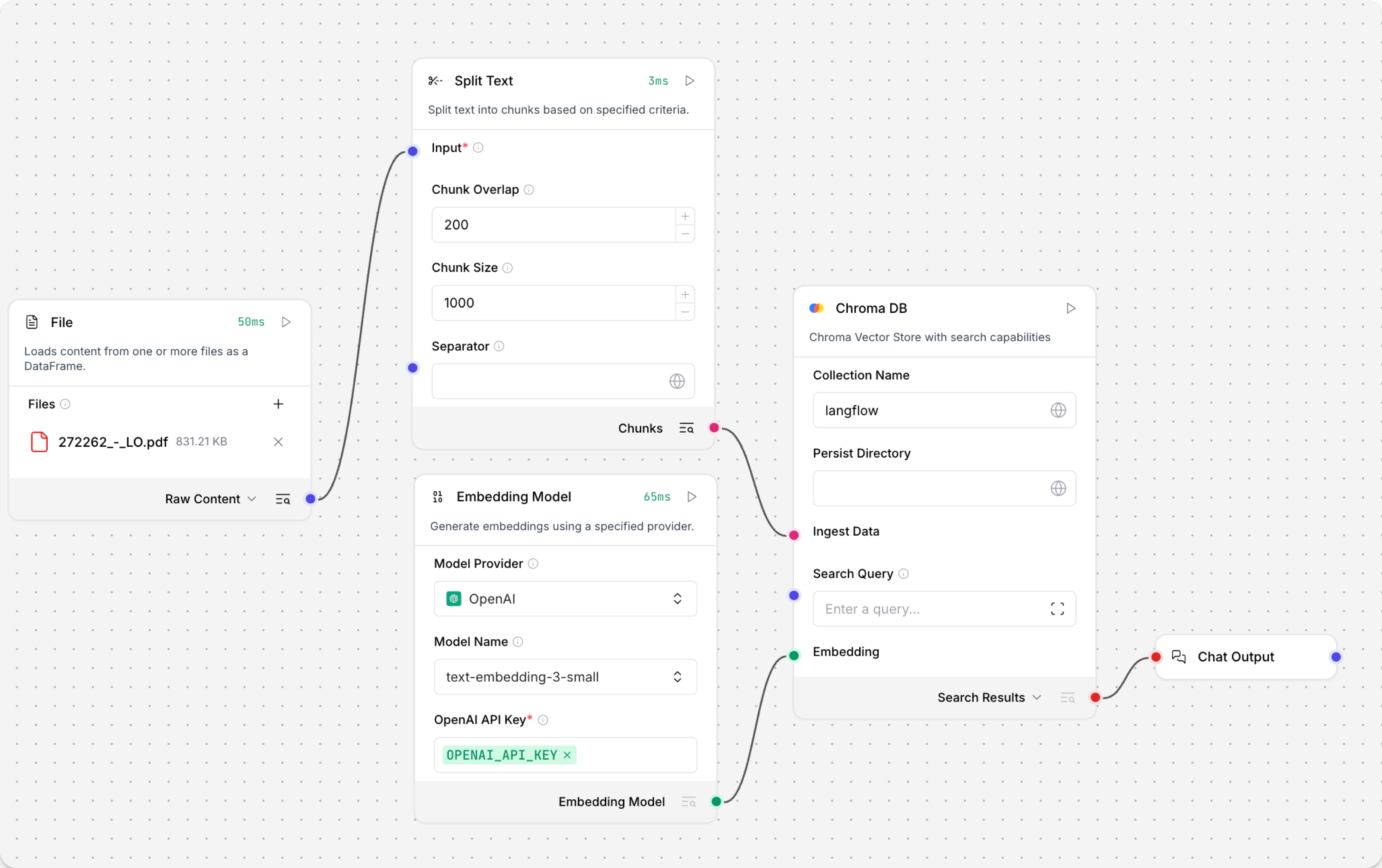
The Load Data subflow is separate from the Retriever subflow because you probably won't run it every time you use the chat. You can run the Load Data subflow as needed to preload or update the data in your vector store. Then, your chat interactions only use the components that are necessary for chat.
If your vector store already contains data that you want to use for vector search, then you don't need to run the Load Data subflow.
-
Open the Playground and start chatting to run the Retriever subflow.
The Retriever subflow generates an embedding from chat input, runs a vector search to retrieve similar content from your vector store, parses the search results into supplemental context for the LLM, and then uses the LLM to generate a natural language response to your query. The LLM uses the vector search results along with its internal training data and tools, such as basic web search and datetime information, to produce the response.
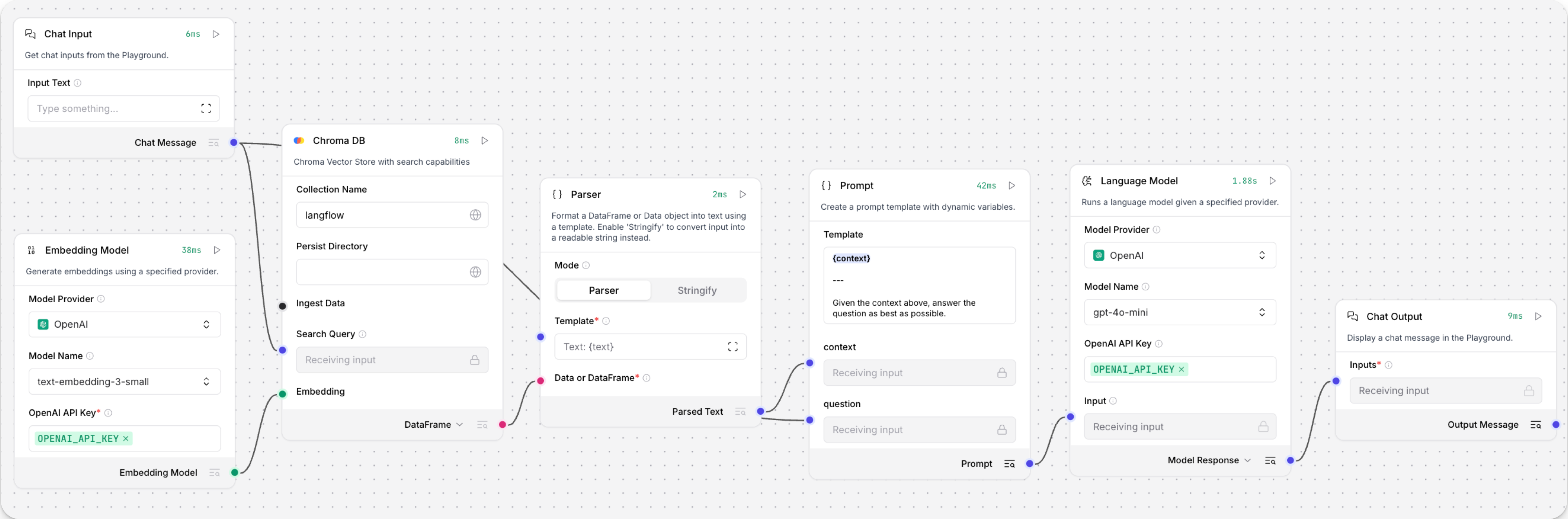
To avoid passing the entire block of raw search results to the LLM, the Parser component extracts
textstrings from the search resultsDataobject, and then passes them to the Prompt Template component inMessageformat. From there, the strings and other template content are compiled into natural language instructions for the LLM.You can use other components for this transformation, such as the Data Operations component, depending on how you want to use the search results.
To view the raw search results, click Inspect output on the vector store component after running the Retriever subflow.
示例:混合搜索
Astra DB 组件支持 Data API 的 混合搜索 (hybrid search) 功能。 混合搜索执行向量相似度搜索和词汇搜索,比较两者的结果,然后返回整体最相关的结果。
要通过 Astra DB 组件使用混合搜索,请执行以下操作:
-
如果您还没有支持混合搜索的集合,请使用 Data API 创建一个支持混合搜索的集合。
虽然您可以通过 Astra DB 组件创建集合,但在使用 Data API 进行此操作时,您可以对集合设置有更多的控制和了解。
-
基于 Hybrid Search RAG 模板创建一个流,该模板包含一个预先配置为混合搜索的 Astra DB 组件。
加载模板后,检查组件上是否有 Upgrade available(可用升级)警报。 如果有任何组件有待处理的升级,请在继续之前升级并重新连接它们。
-
在 Language Model 组件中,添加您的 OpenAI API 密钥。 如果您想使用其他提供商或模型,请参阅 语言模型组件。
-
删除连接到 Structured Output 组件 Input Message 端口的 Language Model 组件,然后将 Chat Input 组件连接到该端口。
-
配置 Astra DB 向量存储组件:
- 输入您的 Astra DB 应用程序令牌。
- 在 Database 字段中,选择您的数据库。
- 在 Collection 字段中,选择您启用了混合搜索的集合。
一旦您选择了一个支持混合搜索的集合,其他参数将自动更新以允许混合搜索选项。
-
将第一个 Parser 组件的 Parsed Text 输出连接到 Astra DB 组件的 Lexical Terms 输入。 此输入仅在连接支持带重排序的混合搜索的集合后才会出现。
-
更新 Structured Output 模板:
-
单击 Structured Output 组件以显示 组件的页眉菜单,然后单击 Controls。
-
找到 Format Instructions 行,单击 Expand,然后将提示替换为以下文本:
_10You are a database query planner that takes a user's requests, and then converts to a search against the subject matter in question._10You should convert the query into:_101. A list of keywords to use against a Lucene text analyzer index, no more than 4. Strictly unigrams._102. A question to use as the basis for a QA embedding engine._10Avoid common keywords associated with the user's subject matter. -
单击 Finish Editing,然后单击 Close 保存对组件的更改。
-
-
打开 Playground,然后输入您要针对数据库提出的自然语言问题。
在此示例中,您的输入将同时发送到 Astra DB 和 Structured Output 组件:
-
直接发送到 Astra DB 组件 Search Query 端口的输入被用作相似度搜索的字符串。 使用集合的 Astra DB vectorize 集成从查询字符串生成嵌入。
-
发送到 Structured Output 组件的输入由 Structured Output、Language Model 和 Parser 组件处理,以提取用于混合搜索中词汇搜索部分的以空格分隔的
keywords。
完整的混合搜索查询将使用 Data API 的
find_and_rerank命令针对您的数据库执行。 API 的响应输出为DataFrame,然后由另一个 Parser 组件转换为文本字符串Message。 最后,Chat Output 组件将Message响应打印到 Playground。 -
-
可选:退出 Playground,然后在每个单独的组件上单击 Inspect Output,以了解词汇关键词是如何构建的,并查看来自 Data API 的原始响应。 这对于调试某些组件未按预期从另一个组件接收输入的流非常有帮助。
-
Structured Output 组件:输出是通过将输出模式应用于 LLM 对输入消息和格式说明的响应而产生的
Data对象。 以下示例基于上述关键词提取说明:_101. Keywords: features, data, attributes, characteristics_102. Question: What characteristics can be identified in my data? -
Parser 组件:输出是从结构化输出
Data中提取的关键词字符串,然后用作混合搜索的词汇项。 -
Astra DB 组件:输出是包含 Data API 返回的混合搜索结果的
DataFrame。
-
Astra DB 输出
If you use a vector store component to query your vector database, it produces search results that you can pass to downstream components in your flow as a list of Data objects or a tabular DataFrame.
If both types are supported, you can set the format near the vector store component's output port in the visual editor.
向量存储连接端口 (Vector Store Connection port)
Astra DB 组件有一个额外的 Vector Store Connection 输出。
此输出只能连接到 VectorStore 输入端口,旨在与专用 Graph RAG 组件配合使用。
唯一支持此输入的非遗留组件是 Graph RAG 组件,它可以作为 Astra DB 组件的 Graph RAG 扩展。 相反,请使用包含向量存储连接和 Graph RAG 功能的 Astra DB Graph 组件。
Astra DB CQL
Astra DB CQL 组件允许代理从 Astra DB 中的 CQL 表查询数据。
输出是包含来自 Astra DB CQL 表的查询结果的 Data 对象列表。每个 Data 对象包含由投影字段指定的文档字段。受 number_of_results 参数限制。
Astra DB CQL 参数
Some parameters are hidden by default in the visual editor. You can modify all parameters through the Controls in the component's header menu.
| 名称 | 类型 | 描述 |
|---|---|---|
| Tool Name | String | 输入参数。在代理提示词中引用该工具时使用的名称。 |
| Tool Description | String | 输入参数。该工具的简短描述,用于引导模型使用它。 |
| Keyspace | String | 输入参数。键空间的名称。 |
| Table Name | String | 输入参数。要查询的 Astra DB CQL 表的名称。 |
| Token | SecretString | 输入参数。Astra DB 的身份验证令牌。 |
| API Endpoint | String | 输入参数。Astra DB API 端点。 |
| Projection Fields | String | 输入参数。要返回的属性,以逗号分隔。默认值:"*"。 |
| Partition Keys | Dict | 输入参数。模型为查询该工具必须填写的必需参数。 |
| Clustering Keys | Dict | 输入参数。模型可以填写以细化查询的可选参数。必需参数应标有感叹号,例如 !customer_id。 |
| Static Filters | Dict | 输入参数。用于过滤查询结果的属性值对。 |
| Limit | String | 输入参数。要返回的记录数量。 |
Graph RAG
Graph RAG 组件使用 GraphRetriever 实例进行 Graph RAG 遍历,从而在 Astra DB 向量存储中实现基于图的文档检索。
有关更多信息,请参阅 DataStax Graph RAG 文档。
Graph RAG 参数
您可以检查向量存储组件的参数,以详细了解它接受的输入、支持的功能以及如何配置它。
Some parameters are hidden by default in the visual editor. You can modify all parameters through the Controls in the component's header menu.
Some parameters are conditional, and they are only available after you set other parameters or select specific options for other parameters. Conditional parameters may not be visible on the Controls pane until you set the required dependencies.
| 名称 | 显示名称 | 信息 |
|---|---|---|
| embedding_model | Embedding Model | 输入参数。指定要使用的嵌入模型。如果连接的向量存储具有 vectorize 集成,则不需要。 |
| vector_store | Vector Store Connection | 输入参数。从 Astra DB 组件 的 Vector Store Connection 输出继承的 AstraDbVectorStore 实例。 |
| edge_definition | Edge Definition | 输入参数。用于图遍历的 边定义 (Edge definition)。 |
| strategy | Traversal Strategies | 输入参数。用于图遍历的策略。策略选项从可用策略中动态加载。 |
| search_query | Search Query | 输入参数。要在向量存储中搜索的查询。 |
| graphrag_strategy_kwargs | Strategy Parameters | 输入参数。用于 检索策略 (retrieval strategy) 的其他可选参数字典。 |
| search_results | Search Results 或 DataFrame | 输出参数。作为 Data 对象列表或表格形式 DataFrame 的基于图的文档检索结果。您可以在组件的输出端口附近设置所需的输出类型。 |
超融合数据库 (Hyper-Converged Database, HCD)
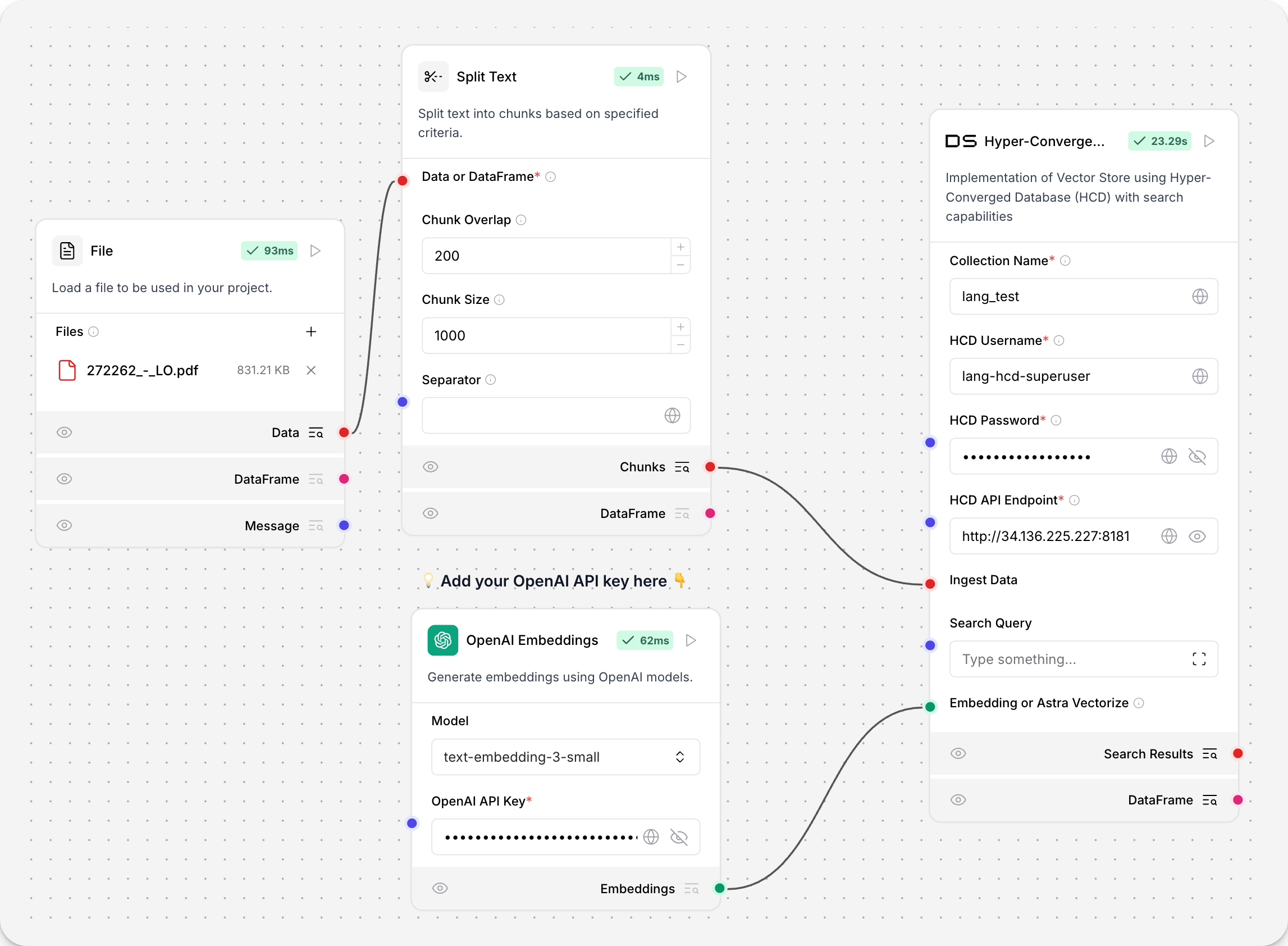
超融合数据库 (HCD) 组件使用集群的 Data API 服务器对 HCD 向量存储进行读写。
因为底层函数调用了源自 Astra DB 的 Data API,所以该组件使用 AstraDBVectorStore 实例。
关于向量存储实例
Because Langflow is based on LangChain, vector store components use an instance of LangChain vector store to drive the underlying read and write functions. These instances are provider-specific and configured according to the component's parameters, such as the connection string, index name, and schema.
In component code, this is often instantiated as vector_store, but some vector store components use a different name, such as the provider name.
Some LangChain classes don't expose all possible options as component parameters. Depending on the provider, these options might use default values or allow modification through environment variables, if they are supported in Langflow. For information about specific options, see the LangChain API reference and vector store provider's documentation.
If you use a vector store component to query your vector database, it produces search results that you can pass to downstream components in your flow as a list of Data objects or a tabular DataFrame.
If both types are supported, you can set the format near the vector store component's output port in the visual editor.
有关 HCD 的更多信息,请参阅 HCD 1.2 入门 和 在 HCD 1.2 中开始使用 Data API。
HCD 参数
您可以检查向量存储组件的参数,以详细了解它接受的输入、支持的功能以及如何配置它。
Some parameters are hidden by default in the visual editor. You can modify all parameters through the Controls in the component's header menu.
Some parameters are conditional, and they are only available after you set other parameters or select specific options for other parameters. Conditional parameters may not be visible on the Controls pane until you set the required dependencies.
| 名称 | 显示名称 | 信息 |
|---|---|---|
| collection_name | Collection Name | 输入参数。HCD 中向量存储集合的名称。对于写入操作,如果集合不存在,则会创建一个新集合。必填。 |
| username | HCD Username | 输入参数。用于验证 HCD 部署的用户名。默认值:hcd-superuser。必填。 |
| password | HCD Password | 输入参数。用于验证 HCD 部署的密码。必填。 |
| api_endpoint | HCD API Endpoint | 输入参数。您部署的 HCD Data API 端点,格式为 http[s]://CLUSTER_HOST:GATEWAY_PORT,其中 CLUSTER_HOST 是集群中任何节点的 IP 地址,GATEWAY_PORT 是 API 网关服务的端口号。例如,http://192.0.2.250:8181。必填。 |
| ingest_data | Ingest Data | 输入参数。要加载到向量存储中的记录。仅与写入相关。 |
| search_input | Search Input | 输入参数。用于相似度搜索的查询字符串。仅与读取相关。 |
| namespace | Namespace | 输入参数。HCD 中包含或将包含 collection_name 中指定的集合的命名空间。默认值:default_namespace。 |
| ca_certificate | CA Certificate | 输入参数。用于与 HCD 进行 TLS 连接的可选 CA 证书。 |
| metric | Metric | Input parameter. The metrics to use for similarity search calculations, either cosine, dot_product, or euclidean. This is a collection setting. If calling an existing collection, leave unset to use the collection's metric. If a write operation creates a new collection, specify the desired similarity metric setting. |
| batch_size | Batch Size | Input parameter. Optional number of records to process in a single batch. |
| bulk_insert_batch_concurrency | Bulk Insert Batch Concurrency | Input parameter. Optional concurrency level for bulk write operations. |
| bulk_insert_overwrite_concurrency | Bulk Insert Overwrite Concurrency | Input parameter. Optional concurrency level for bulk write operations that allow upserts (overwriting existing records). |
| bulk_delete_concurrency | Bulk Delete Concurrency | Input parameter. Optional concurrency level for bulk delete operations. |
| setup_mode | Setup Mode | Input parameter. Configuration mode for setting up the vector store, either Sync (default), Async, or Off. |
| pre_delete_collection | Pre Delete Collection | Input parameter. Whether to delete the collection before creating a new one. |
| metadata_indexing_include | Metadata Indexing Include | Input parameter. A list of metadata fields to index if you want to enable selective indexing only when creating a collection. Doesn't apply to existing collections. Only one *_indexing_* parameter can be set per collection. If all *_indexing_* parameters are unset, then all fields are indexed (default indexing). |
| metadata_indexing_exclude | Metadata Indexing Exclude | Input parameter. A list of metadata fields to exclude from indexing if you want to enable selective indexing only when creating a collection. Doesn't apply to existing collections. Only one *_indexing_* parameter can be set per collection. If all *_indexing_* parameters are unset, then all fields are indexed (default indexing). |
| collection_indexing_policy | Collection Indexing Policy | Input parameter. A dictionary to define the indexing policy if you want to enable selective indexing only when creating a collection. Doesn't apply to existing collections. Only one *_indexing_* parameter can be set per collection. If all *_indexing_* parameters are unset, then all fields are indexed (default indexing). The collection_indexing_policy dictionary is used when you need to set indexing on subfields or a complex indexing definition that isn't compatible as a list. |
| embedding | Embedding or Astra Vectorize | Input parameter. The embedding model to use by attaching an Embedding Model component. This component doesn't support additional vectorize authentication headers, so it isn't possible to use a vectorize integration with this component, even if you have enabled one on an existing HCD collection. |
| number_of_results | Number of Results | Input parameter. Number of search results to return. Default: 4. Only relevant to reads. |
| search_type | Search Type | Input parameter. Search type to use, either Similarity (default), Similarity with score threshold, or MMR (Max Marginal Relevance). Only relevant to reads. |
| search_score_threshold | Search Score Threshold | Input parameter. Minimum similarity score threshold for search results if the search_type is Similarity with score threshold. Default: 0. |
| search_filter | Search Metadata Filter | Input parameter. Optional dictionary of metadata filters to apply in addition to vector search. |
Other DataStax components
The following components are also included in the DataStax bundle.
Astra DB Chat Memory
The Astra DB Chat Memory component retrieves and stores chat messages using an Astra DB database.
Chat memories are passed between memory storage components as the Memory data type.
Specifically, the component creates an instance of AstraDBChatMessageHistory, which is a LangChain chat message history class that uses Astra DB for storage.
The Astra DB Chat Memory component isn't recommended for most memory storage because memories tend to be long JSON objects or strings, often exceeding the maximum size of a document or object supported by Astra DB.
However, Langflow's Agent component includes built-in chat memory that is enabled by default. Your agentic flows don't need an external database to store chat memory. For more information, see Memory management options.
For more information about using external chat memory in flows, see the Message History component.
Astra DB Chat Memory parameters
Some parameters are hidden by default in the visual editor. You can modify all parameters through the Controls in the component's header menu.
| Name | Type | Description |
|---|---|---|
| collection_name | String | Input parameter. The name of the Astra DB collection for storing messages. Required. |
| token | SecretString | Input parameter. The authentication token for Astra DB access. Required. |
| api_endpoint | SecretString | Input parameter. The API endpoint URL for the Astra DB service. Required. |
| namespace | String | Input parameter. The optional namespace within Astra DB for the collection. |
| session_id | MessageText | Input parameter. The unique identifier for the chat session. Uses the current session ID if not provided. |
Legacy DataStax components
Legacy components are longer supported and can be removed in a future release. You can continue to use them in existing flows, but it is recommended that you replace them with supported components as soon as possible. Suggested replacements are included in the Legacy banner on components in your flows. They are also given in release notes and Langflow documentation whenever possible.
If you aren't sure how to replace a legacy component, Search for components by provider, service, or component name. The component may have been deprecated in favor of a completely new component, a similar component, or a new version of the same component in a different category.
If there is no obvious replacement, consider whether another component can be adapted to your use case. For example, many Core components provide generic functionality that can support multiple providers and use cases, such as the API Request component.
If neither of these options are viable, you could use the legacy component's code to create your own custom component, or start a discussion about the legacy component.
To discourage use of legacy components in new flows, these components are hidden by default. In the visual editor, you can click Component settings to toggle the Legacy filter.
The following DataStax components are in legacy status:
Astra DB Tool
Replace the Astra DB Tool component with the Astra DB component.
The Astra DB Tool component enables searching data in Astra DB collections, including hybrid search, vector search, and regular filter-based search. Specialized searches require that the collection is pre-configured with the required parameters.
Outputs a list of Data objects containing the query results from Astra DB. Each Data object contains the document fields specified by the projection attributes. Limited by the number_of_results parameter and the upper limit of the Astra DB Data API, depending on the type of search.
You can use the component to execute queries directly as isolated steps in a flow, or you can connect it as a tool for an agent to allow the agent to query data from Astra DB collections as needed to respond to user queries.
The values for Collection Name, Astra DB Application Token, and Astra DB API Endpoint are found in your Astra DB deployment. For more information, see the Astra DB Serverless documentation.
| Name | Type | Description |
|---|---|---|
| Tool Name | String | Input parameter. The name used to reference the tool in the agent's prompt. |
| Tool Description | String | Input parameter. A brief description of the tool. This helps the model decide when to use it. |
| Keyspace Name | String | Input parameter. The name of the keyspace in Astra DB. Default: default_keyspace |
| Collection Name | String | Input parameter. The name of the Astra DB collection to query. |
| Token | SecretString | Input parameter. The authentication token for accessing Astra DB. |
| API Endpoint | String | Input parameter. The Astra DB API endpoint. |
| Projection Fields | String | Input parameter. Comma-separated list of attributes to return from matching documents. The default is the default projection, *, which returns all attributes except reserved fields like $vector. |
| Tool Parameters | Dict | Input parameter. Astra DB Data API find filters that become tools for an agent. These Filters may be used in a search, if the agent selects them. |
| Static Filters | Dict | Input parameter. Attribute-value pairs used to filter query results. Equivalent to Astra DB Data API find filters. Static Filters are included with every query. Use Static Filters without semantic search to perform a regular filter search. |
| Number of Results | Int | Input parameter. The maximum number of documents to return. |
| Semantic Search | Boolean | Input parameter. Whether to run a similarity search by generating a vector embedding from the chat input and following the Semantic Search Instruction. Default: false. If true, you must attach an embedding model component or have vectorize pre-enabled on your collection. |
| Use Astra DB Vectorize | Boolean | Input parameter. Whether to use the Astra DB vectorize feature for embedding generation when running a semantic search. Default: false. If true, you must have vectorize pre-enabled on your collection. |
| Embedding Model | Embedding | Input parameter. A port to attach an embedding model component to generate a vector from input text for semantic search. This can be used when Semantic Search is true, with or without vectorize. Be sure to use a model that aligns with the dimensions of the embeddings already present in the collection. |
| Semantic Search Instruction | String | Input parameter. The query to use for similarity search. Default: "Find documents similar to the query.". This instruction is used to guide the model in performing semantic search. |
Astra DB Graph
Replace the Astra DB Graph component with the Graph RAG component.
The Astra DB Graph component uses AstraDBGraphVectorStore, an instance of LangChain graph vector store, for graph traversal and graph-based document retrieval in an Astra DB collection. It also supports writing to the vector store.
For more information, see Build a Graph RAG system with LangChain and GraphRetriever.
You can inspect a vector store component's parameters to learn more about the inputs it accepts, the features it supports, and how to configure it.
Some parameters are hidden by default in the visual editor. You can modify all parameters through the Controls in the component's header menu.
Some parameters are conditional, and they are only available after you set other parameters or select specific options for other parameters. Conditional parameters may not be visible on the Controls pane until you set the required dependencies.
For information about accepted values and functionality, see the Astra DB Serverless documentation or inspect component code.
| Name | Display Name | Info |
|---|---|---|
| token | Astra DB Application Token | Input parameter. An Astra application token with permission to access your vector database. Once the connection is verified, additional fields are populated with your existing databases and collections. If you want to create a database through this component, the application token must have Organization Administrator permissions. |
| api_endpoint | API Endpoint | Input parameter. Your database's API endpoint. |
| keyspace | Keyspace | Input parameter. The keyspace in your database that contains the collection specified in collection_name. Default: default_keyspace. |
| collection_name | Collection | Input parameter. The name of the collection that you want to use with this flow. For write operations, if a matching collection doesn't exist, a new one is created. |
| metadata_incoming_links_key | Metadata Incoming Links Key | Input parameter. The metadata key for the incoming links in the vector store. |
| ingest_data | Ingest Data | Input parameter. Records to load into the vector store. Only relevant for writes. |
| search_input | Search Query | Input parameter. Query string for similarity search. Only relevant to reads. |
| cache_vector_store | Cache Vector Store | Input parameter. Whether to cache the vector store in Langflow memory for faster reads. Default: Enabled (true). |
| embedding_model | Embedding Model | Input parameter. Attach an embedding model component to generate embeddings. If the collection has a vectorize integration, don't attach an embedding model component. |
| metric | Metric | Input parameter. The metrics to use for similarity search calculations, either cosine (default), dot_product, or euclidean. This is a collection setting. |
| batch_size | Batch Size | Input parameter. Optional number of records to process in a single batch. |
| bulk_insert_batch_concurrency | Bulk Insert Batch Concurrency | Input parameter. Optional concurrency level for bulk write operations. |
| bulk_insert_overwrite_concurrency | Bulk Insert Overwrite Concurrency | Input parameter. Optional concurrency level for bulk write operations that allow upserts (overwriting existing records). |
| bulk_delete_concurrency | Bulk Delete Concurrency | Input parameter. Optional concurrency level for bulk delete operations. |
| setup_mode | Setup Mode | Input parameter. Configuration mode for setting up the vector store, either Sync (default) or Off. |
| pre_delete_collection | Pre Delete Collection | Input parameter. Whether to delete the collection before creating a new one. Default: Disabled (false). |
| metadata_indexing_include | Metadata Indexing Include | Input parameter. A list of metadata fields to index if you want to enable selective indexing only when creating a collection. Doesn't apply to existing collections. Only one *_indexing_* parameter can be set per collection. If all *_indexing_* parameters are unset, then all fields are indexed (default indexing). |
| metadata_indexing_exclude | Metadata Indexing Exclude | Input parameter. A list of metadata fields to exclude from indexing if you want to enable selective indexing only when creating a collection. Doesn't apply to existing collections. Only one *_indexing_* parameter can be set per collection. If all *_indexing_* parameters are unset, then all fields are indexed (default indexing). |
| collection_indexing_policy | Collection Indexing Policy | Input parameter. A dictionary to define the indexing policy if you want to enable selective indexing only when creating a collection. Doesn't apply to existing collections. Only one *_indexing_* parameter can be set per collection. If all *_indexing_* parameters are unset, then all fields are indexed (default indexing). The collection_indexing_policy dictionary is used when you need to set indexing on subfields or a complex indexing definition that isn't compatible as a list. |
| number_of_results | Number of Results | Input parameter. Number of search results to return. Default: 4. Only relevant to reads. |
| search_type | Search Type | Input parameter. Search type to use, either Similarity, Similarity with score threshold, or MMR (Max Marginal Relevance), Graph Traversal, or MMR (Max Marginal Relevance) Graph Traversal (default). Only relevant to reads. |
| search_score_threshold | Search Score Threshold | Input parameter. Minimum similarity score threshold for search results if the search_type is Similarity with score threshold. Default: 0. |
| search_filter | Search Metadata Filter | Input parameter. Optional dictionary of metadata filters to apply in addition to vector search. |
Assistants API components
The following DataStax components were used to create and manage Assistants API functions in a flow:
- Astra Assistant Agent
- Create Assistant
- Create Assistant Thread
- Get Assistant Name
- List Assistants
- Run Assistant
These components are legacy and should be replaced with Langflow's native agent components.
Environment variable components
The following DataStax components were used to load and retrieve environment variables in a flow:
- Dotenv: Loads environment variables from a
.envfile - Get Environment Variable: Retrieves the value of an environment variable
These components are legacy. Use Langflow's built-in environment variable support or global variables instead.
Astra Vectorize
This component was deprecated in Langflow version 1.1.2. Replace it with the Astra DB component.
The Astra DB Vectorize component was used to generate embeddings with Astra DB's vectorize feature in conjunction with an Astra DB component.
The vectorize functionality is now built into the Astra DB component. You no longer need a separate component for vectorize embedding generation.