Google 组件
捆绑包 (Bundles) 包含支持 Langflow 与特定第三方集成的自定义组件。
本页描述了 Google 捆绑包中可用的组件。
BigQuery
Langflow 通过 Google 捆绑包 中的 BigQuery 组件与 Google BigQuery 集成,允许您执行 SQL 查询并从 BigQuery 数据集中检索数据。
在流中使用 BigQuery 组件
要在流中使用 BigQuery 组件,您需要以下内容:
- 一个已启用 BigQuery API 的 Google Cloud 项目
- 一个具有 BigQuery Job User 角色权限的 服务账号
- 一个 BigQuery 数据集和数据表
- 一个 正在运行的 Langflow 服务器
创建具有 BigQuery 访问权限的服务账号
- 选择并启用您的 Google Cloud 项目。 有关更多信息,请参阅 创建 Google Cloud 项目。
- 在您的 Google Cloud 项目中创建一个服务账号。 有关更多信息,请参阅 创建服务账号。
- 为您的新账号分配 BigQuery Job User 角色。 此角色允许 Langflow 使用服务账号访问 BigQuery 资源。 您可能还需要允许访问您的 BigQuery 数据集。 有关更多信息,请参阅 使用 IAM 进行 BigQuery 访问控制。
- 要为服务账号生成新的 JSON 密钥,请导航至您的服务账号。
- 点击 添加密钥 (Add Key),然后点击 创建新密钥 (Create new key)。
- 在 密钥类型 (Key type) 下,选择 JSON,然后点击 创建 (Create)。 一个 JSON 私钥文件会下载到您的机器上。 现在您有了服务账号和 JSON 私钥,您需要在 Langflow 的 BigQuery 组件中配置凭据。
在 Langflow 组件中配置凭据
配置好服务账号并创建凭据 JSON 文件后,请按照以下步骤对 Langflow 应用程序进行身份验证。
- 在 Langflow 中创建一个新流。
- 在 捆绑包 (Bundles) 中,找到 Google BigQuery 组件,然后将其添加到您的流中。
- 在 BigQuery 组件的 上传服务账号 JSON (Upload Service Account JSON) 字段中,点击 选择文件 (Select file)。
- 在 我的文件 (My Files) 面板中,选择 点击或拖拽文件到此处 (Click or drag files here)。 您的文件浏览器会打开。
- 在文件浏览器中,选择服务账号 JSON 文件,然后点击 打开 (Open)。
- 在 我的文件 (My Files) 面板中,选择您的服务账号 JSON 文件,然后点击 选择文件 (Select files)。 BigQuery 组件现在可以使用您的服务账号 JSON 文件查询您的数据集和表。
查询 BigQuery 数据集
配置好组件凭据后,查询您的 BigQuery 数据集和表以确认连接性。
-
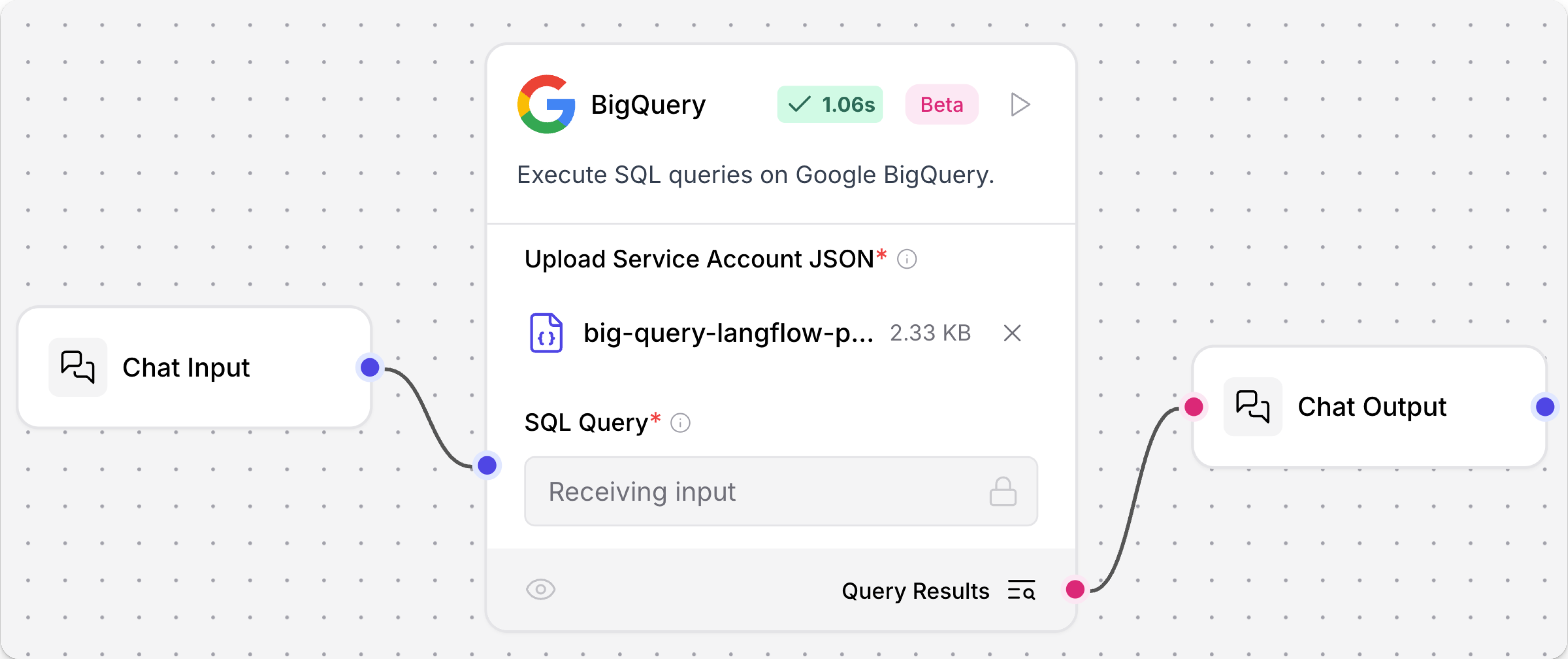
将 聊天输入 (Chat Input) 和 聊天输出 (Chat Output) 组件连接到 BigQuery 组件。
-
打开 游乐场 (Playground),然后提交一个有效的 SQL 查询。
此示例查询了一个存储在名为
the_oscar_award的 BigQuery 数据集中的奥斯卡获奖者表:_10SELECT film, category, year_film_10FROM `big-query-langflow-project.the_oscar_award.oscar_winners`_10WHERE winner = TRUE_10LIMIT 10结果
_11film category year_film_11The Last Command ACTOR 1927_117th Heaven ACTRESS 1927_11The Dove; ART DIRECTION 1927_11Sunrise CINEMATOGRAPHY 1927_11Sunrise CINEMATOGRAPHY 1927_11Two Arabian Knights DIRECTING (Comedy Picture) 1927_117th Heaven DIRECTING (Dramatic Picture) 1927_11Wings ENGINEERING EFFECTS 1927_11Wings OUTSTANDING PICTURE 1927_11Sunrise UNIQUE AND ARTISTIC PICTURE 1927成功的聊天确认了该组件可以访问 BigQuery 表。
Google 生成式 AI (Google Generative AI)
此组件使用 Google 生成式 AI 模型 生成文本。
Google 生成式 AI 参数
| 名称 | 类型 | 描述 |
|---|---|---|
| Google API Key | SecretString | 输入参数。用于 Google 生成式 AI 的 Google API 密钥。 |
| Model | String | 输入参数。要使用的模型名称,例如 "gemini-pro"。 |
| Max Output Tokens | Integer | 输入参数。生成的最大标记 (tokens) 数。 |
| Temperature | Float | 输入参数。使用此温度运行推理。 |
| Top K | Integer | 输入参数。考虑前 K 个最可能的标记集。 |
| Top P | Float | 输入参数。采样时考虑的标记最大累积概率。 |
| N | Integer | 输入参数。每个提示词生成的聊天完成次数。 |
| model | LanguageModel | 输出参数。配置了指定参数的 ChatGoogleGenerativeAI 实例。 |
Google 生成式 AI 嵌入 (Google Generative AI Embeddings)
Google Generative AI Embeddings 组件使用 langchain-google-genai 包中的 GoogleGenerativeAIEmbeddings 类连接到 Google 的生成式 AI 嵌入服务。
有关在流中使用嵌入模型组件的更多信息,请参阅 嵌入模型组件。
Google 生成式 AI 嵌入参数
| 名称 | 显示名称 | 信息 |
|---|---|---|
| api_key | API Key | 输入参数。用于访问 Google 生成式 AI 服务的机密 API 密钥。必填。 |
| model_name | 模型名称 (Model Name) | 输入参数。要使用的嵌入模型名称。默认值:"models/text-embedding-004"。 |
| embeddings | 嵌入 (Embeddings) | 输出参数。构建好的 GoogleGenerativeAIEmbeddings 对象。 |
Google 搜索 API (Google Search API)
此组件允许您调用 Google 搜索 API。
Google 搜索 API 参数
| 名称 | 类型 | 描述 |
|---|---|---|
| google_api_key | SecretString | 输入参数。用于身份验证的 Google API 密钥。 |
| google_cse_id | SecretString | 输入参数。Google 自定义搜索引擎 ID。 |
| input_value | String | 输入参数。搜索查询输入。 |
| k | Integer | 输入参数。要返回的搜索结果数量。 |
| results | List[Data] | 输出参数。搜索结果列表。 |
| tool | Tool | 输出参数。用于 LangChain 的 Google 搜索工具。 |
其他 Google 搜索组件
Langflow 包含多个支持 Google 搜索的组件,例如:
Google Vertex AI
有关 Vertex AI 组件的信息,请参阅 Vertex AI 捆绑包。
遗留 Google 组件
Legacy components are longer supported and can be removed in a future release. You can continue to use them in existing flows, but it is recommended that you replace them with supported components as soon as possible. Suggested replacements are included in the Legacy banner on components in your flows. They are also given in release notes and Langflow documentation whenever possible.
If you aren't sure how to replace a legacy component, Search for components by provider, service, or component name. The component may have been deprecated in favor of a completely new component, a similar component, or a new version of the same component in a different category.
If there is no obvious replacement, consider whether another component can be adapted to your use case. For example, many Core components provide generic functionality that can support multiple providers and use cases, such as the API Request component.
If neither of these options are viable, you could use the legacy component's code to create your own custom component, or start a discussion about the legacy component.
To discourage use of legacy components in new flows, these components are hidden by default. In the visual editor, you can click Component settings to toggle the Legacy filter.
以下 Google 组件处于遗留状态:
Google OAuth Token
Google OAuth Token 组件在 Langflow 1.4.0 中已弃用。
要将您的流连接到 Google OAuth 服务,请使用 Composio 组件。
Gmail Loader
此组件使用 服务账号 JSON 凭据和标签 ID 过滤器从 Gmail 加载电子邮件。
作为替代方案,您可以使用 Composio 组件 将您的流连接到 Google 服务。
Google Drive Loader
此组件使用 服务账号 JSON 凭据和文档 ID 过滤器从 Google 云端硬盘加载文档。
虽然没有直接的替代组件,但可以考虑使用 API 请求 (API Request) 组件 来调用 Google Drive API。
Google Drive Search
此组件使用 服务账号 JSON 凭据以及各种查询字符串和过滤器搜索 Google 云端硬盘。
虽然没有直接的替代组件,但可以考虑使用 API 请求 (API Request) 组件 来调用 Google Drive API。